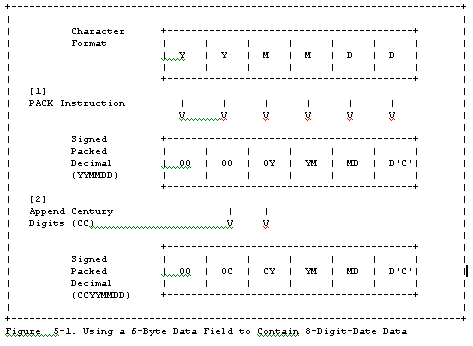
You must now rework those programs that reference this data to interpret it correctly. To distinguish character data from packed decimal data, your routine can examine the first byte; a value of X'00' indicates "packed decimal," otherwise the routine c an assume the field contains character date data (a 2-digit year date).
Append a Century Indicator
Pack a 3-digit date field with a 4-digit year date by the use of the "CYY" format. Using a conversion table or offset, you can indicate, for example, that C=0, 1, or 2 represents 19, 20, or 21, respectively. When your application appends the "C" to the "YY" field, your system produces full, 4-digit year dates, the range of which depends on the conversion mechanism. Using decimals 0-9 to represent 19-28, this scheme provides a solution from 1900 through 2899, but it is likely to require end-user procedu ral changes, education, and typical learning curve time and errors.
One advantage to setting C=0 to represent 19 and so on is that it might provide a compatible, non-disruptive change to some existing application routines if such a field is currently prefixed to your "YY" data field and set to 0.
A variation on this same scheme would include the use of the "CCYY" format where the "CC" can be used to represent the actual century indicator, 18, 19, 20 and so on, or an encoded value for example, "00", "01", and "02", to represent 19, 20, 21, respe ctively (see "Solution #1: Conversion to Full 4-Digit-Year Format" on page 5-2).
When adding either the "C" or "CC" prefix to the "YY" field for "CYY" or "CCYY" representation, "C" or "CC" can be extracted from a separate field, one that is not necessarily adjacent to or preceding the "YY" field. This then can relieve any restricti ons you might currently have due to your date field length. It does, however, require further programming logic and data manipulation.
Pros and Cons
PROS
1. Programs that use this scheme do not need to access the output of the 2-character conversion simultaneously. Programs can be updated to handle the new and old date formats one at a time. When all programming considerations are made, you can then upd ate your database to the new compressed format at a time convenient to other year2000 projects.
Consider converting individual programs when each is due of maintenance while your dedicated year2000 team continues on other aspects of the conversions.
2. No need to expand the 2-digit-year data format to 4-digit data format. (For example, there is no need to increase the fields in data bases and tables to accommodate dates above 99 which would increase DASD usage.) Further, this saves the effort that would be required to rebuild your database(s) or the need to change record sizes and JCL.
3. Can distinguish years from different centuries using the 2-character-year format.
4. Sort algorithms do not require change.
5. If you use a COBOL COMP-3 format, you can pack a CCYYMMDD date into an existing 6-byte field (with one byte left over). This technique allows you to retain the original field size and eliminates your need to relocate adjacent fields. Applications th at use the data for calculations run faster because the data is already packed.
6. If you use a flagged Julian format (CYYDDD) where "C" is used as the 'century indicator', the format does not require expansion of the date field.
CONS
1. Depending upon the choice of data representation you implement, you might experience incorrect data sequencing if you do not add further programming logic.
2. Your choice of compression technique might prove incompatible when moving or sharing data across different platforms. For example, packed decimal, although useful on a mainframe system might cause incompatibilities when used on other smaller systems such as a personal computer.
3. You must convert the data before it can be displayed in Gregorian format. You can, of course, read the date date in a hexadecimal dump without conversion.
SOLUTION #3: WINDOWING TECHNIQUES
This is a 2-digit solution that externalizes either 2-digit or 4-digit-year formats. This approach requires changes to your programs only; no data changes are required.
CAUTION
THESE APPROACHES CAN BE APPLIED ONLY TO
DATES WITHIN A MAXIMUM 100-YEAR PERIOD AT ANY ONE TIME.
THIS SOLUTION IS CONSIDERED TEMPORARY BECAUSE THERE IS
NO GUARANTEE THAT IN THE FUTURE, YOUR APPLICATIONS WILL
NOT EXPAND TO PROCESS DATES THAT ARE MORE THAN 1 00
YEARS APART. THEREFORE, THIS APPROACH ALWAYS CARRIES
WITH IT A POTENTIAL FUTURE EXPOSURE. (FOR EXAMPLE,
HUMANS ARE LIVING LONGER. THEREFORE DATA BASES THAT
INCLUDE BIRTHDAYS (MEDICAL, CIVIL, INSURANCE, AND SO
ON) AND THE APPLICATIONS THAT ACCESS THAT D ATA ARE
ALREADY AT RISK WITH MANY DATES SPANNING 100+ YEARS.)
Two types of WINDOWING techniques have been defined: the fixed window technique and the sliding (rolling) window technique.
Fixed Window Technique
years in the past and future relative to a specific year within the 100-year interval.Consider this specific example: if the years of date-related data of your application fall in the range of 1961-January-01 to 2060-December-31, you can use a 2-digit year to distinguish dates prior to the year 2000 from the year 2000 and beyond. If using the current system year of 1996, the number of years in the past and future are specified as 35 and 64, respectively. Program logic determines the century based on the following data checking. If the 2-digit year representation of a specific year is "x y" then if:
o "xy"r61, then it is a 20th century date (19"xy")
o Otherwise (that is, "xy"s60), it is a 21st century date (20"xy").
If, for example, you need to maintain a window of 35 past years and 64 future years, such that in 1997 your application can successfully deal with dates in the range 1962 through 2061, you need to adjust this program checking every year. The inherent f uture risk when employing this technique should be obvious, and when compared to the sliding window technique is far less desirable.
Furthermore, you will likely need to use a different 100-year window for each application because the date context varies among them. In so doing, you are adding one more level of complexity to your overall programming environment - that of potentially losing track of when each application must be adjusted or which applications require yearly window adjustment.
Pros and Cons
PROS
1. No need to expand the 2-digit-year data to a 4-digit format.
2. Can provide 4-digit-year format for data reference.
3. Can distinguish years from different centuries using only 2-digit-year format (provided the years being processed are in a range of 100 years at any one time).
4. Can be useful if the particular program is being phased out, and a temporary solution is appropriate.
CONS
1. Potential exposures exist when/if the function of the software application needs to process years beyond the range of 100 years.
2. Expect a performance impact in direct proportion to the quantity of date processing the particular application handles due to the overhead of 2- to 4-digit-year conversion.
3. All programs that use the fixed window technique might need to be manually updated on a yearly basis depending on how your date routine is packaged.
4. All programs that accept output from the fixed window technique must use the same assumptions (current date, past and future windows).
5. Retaining a 2-digit year representation does not provide collating sequence support. Nor does the use of a fixed window technique provide indexing sequence support when 2-digit years are used as index keys in indexed files. You will need to provide additional processing to obtain correct collating and indexing sequence output.
Sliding Window Technique
The SLIDING WINDOW technique uses a self-advancing 100-year interval that generally crosses a century boundary. This technique determines the century of a 2-digit year by comparing the 2-digit year against a window of 100 years. The user specifies the number of years in the past and future relative to the system year (generally the current year) that the system sets and maintains. Your applications can access the date that the system sets and automatically advances. This is the main advantage of using a sliding window over the fixed window (where the window is immovable without manually revising the programs each year).As appropriate to your application environment, you can maintain more than one window. For example, you could set one window to process historical dates, one for mortgage dates, one for birth dates, and so on; and the program adjusts the system date an d past and future windows to meet the specific application's needs.
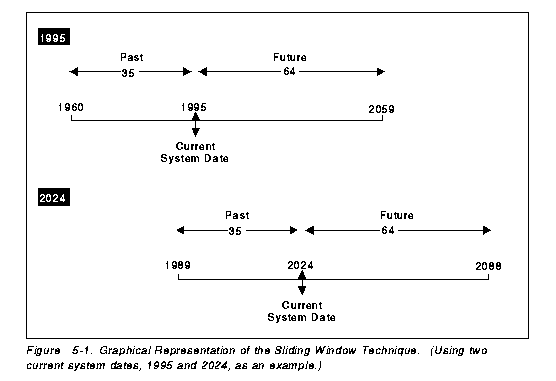
Consider this specific example. If the dates in your application fall into a range of 35 years in the past and 64 years into the future, based on the current year, 1995, your program can accept and accurately deal with dates of 1960 through 2059. Next year, 1996, the window advances and your application accurately deals with dates of 1961 through 2060.
Graphically, Figure 5-2 on page 5-9 illustrates this example using the current (1995) 100-year window and that same window when the current system date has progressed to the year 2024.
A sliding window approach requires programming logic to interpret the meaning of all 2-digit year data. Such additional programming logic could be packaged into a common data/time service routine, callable from a 2-digit year data exploiter. This would reduce the programming overhead and impact to the calling programs. IBM's product, Language Environment, provides common date/time service routines with sliding window features. By default, Language Environment uses a window of 80 years in the past and 2 0 years into the future that automatically adjusts based on the current year date. For details on using and setting the past/future window range, refer to Chapter 8, "Tool Categories and Available Tools to Ease Year2000 Changes" on page 8-1. For an exampl e of how DFSORT/MVS implemented a sliding window to sort, merge, and transform 2-digit year data to 4-digit year data, refer to "DFSORT" on page 8-26
Pros and Cons
PROS
1. No need to expand the 2-digit-year format to a 4-digit format.
2. Can provide 4-digit-year format for data reference.
3. Can distinguish years from different centuries using only 2-digit-year format (provided the years being processed are in the range of 100 years at any one time).
4. No need to convert the date data to a new date representation scheme.
CONS
1. Potential exposures exist when/if the function of the software application needs to process years beyond the range of 100 years
2. Potential performance impact in direct proportion to the quantity of date processing the particular application handles
3. All programs that accept output from the sliding window technique must use the same assumptions (current date, past and future windows)
4. Retaining a 2-digit year representation does not provide collating sequence support. Nor does the use of a sliding window technique provide indexing sequence support when 2-digit years are used as index keys in indexed files. You will need to provid e additional processing to obtain correct collating and indexing sequence output.
SOLUTION #4: A 2-DIGIT ENCODING SCHEME
The ENCODING solution is a 2-digit solution that externalizes only a 2-digit-year format. It requires changes to both your data and your programs. It also requires that you convert, simultaneously, all applications that reference or use the updated dat a.
Example techniques include ENCODING 4-digit-year data into 2-digit existing space. This section presents several specific examples, many others exist and might prove more applicable to your specific needs.
CAUTION:
APPLY THIS APPROACH WITH CAUTION. IT IS
GENERALLY CONSIDERED TO BE THE LEAST DESIRABLE
APPROACH. BE CERTAIN THAT THE NEW ENCODING OR
NUMBERING SCHEME DOES NOT AFFECT THE PROPER FUNCTIONING
OF YOUR PROGRAMS AFTER ALL THE DATA CHANGES ARE
IMPLEMENTED.
THIS SOLUTION IS CONSIDERED TEMPORARY BECAUSE THERE IS NO GUARANTEE THAT IN THE FUTURE, YOUR APPLICATIONS WILL NOT EXPAND TO PROCESS DATES THAT ARE OUTSIDE THE ENCODING LIMITS.
Some examples include:
o EXAMPLE 1: Convert the numbering scheme from two decimal digits to two hexadecimal digits. Two hexadecimal digits allow the ability to represent numbers up to 255; therefore, providing the ability to represent dates between 1900 and 2155, for example :
1900 + X'FF' = 1900 + 255 = 2155
Specific date conversions might be:
- Convert the year 1900 represented by D'00' to X'00'
- Convert the year 1999 represented by D'99' to X'63'
- Convert the year 2000 represented by D'00' to X'64'
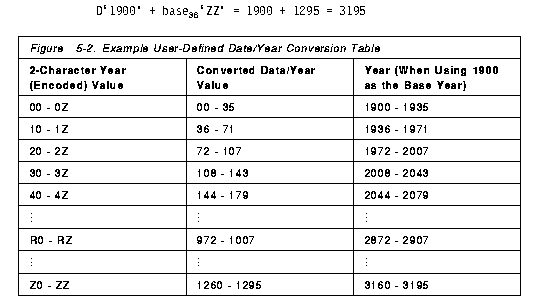
o EXAMPLE 3: Convert the numbering scheme from decimal to a user-defined numbering scheme. The mapping between the new and old schemes can be defined by a table or mapping function; and the conversion between the two numbering schemes can be done by table lookup or functional mapping. Figure 5-3 on page 5-12 presents one such possible user-defined table that provides for values up to 1295 within a 2-digit field. This scheme uses the characters 0-9 and A-Z to represent decimal values 0-35, respectively. This base 36 notation is thereby capable of extending the hexadecimal example on page 5-11 by 1040 more years. For example:
D'1900' + base[36]'ZZ' = 1900 + 1295 = 3195
Pros and Cons
PROS
1. No need to expand the 2-digit-year data format to 4-digit data format. (For example, there is no need to increase the fields in data bases and tables to accommodate dates above 99 which would increase DASD usage.) Further, this saves the effort that would be required to rebuild your database(s).
2. Can distinguish years from different centuries using the 2-character-year format.
3. If you use a COBOL COMP-3 format, you can pack a CCYYMMDD date into an existing 6-byte field (with one byte left over). This technique allows you to retain the original field size and eliminates your need to relocate adjacent fields. Applications th at use the data for calculations run faster because the data is already packed.
4. If you use a flagged Julian format (CYYDDD) where "C" is used as the 'century indicator', the format does not require expansion of the date field.
CONS
1. Depending upon the choice of data representation you implement, this scheme can be applied only to a limited date range. For example, you are limited to 255 years when using hexadecimal representation.
2. All programs that use this scheme and need to access the output of the 2-character conversion must change simultaneously.
3. Your choice of encoding technique might prove incompatible when moving or sharing data across different platforms.
4. Due to data conversion (calls and processing) you might experience a performance impact in direct proportion to the quantity of date processing the particular application handles.
5. Depending upon the choice of data representation you implement, you might experience incorrect data sequencing if you do not add further programming logic.
6. Encoded dates require conversion whenever you work with that data. Therefore, the presence of encoded dates will add another layer of complexity to such tasks as problem determination.
7. You must convert the data before it can be displayed in Gregorian format, and some encoded data can only be viewed in hexadecimal format. This is both impractical for human reading and also impractical or impossible to print.
USING A COMMON DATE/TIME SERVICE ROUTINE
In large system applications it is common to find that more than one date/time service is in use. However, some date/time service routines might have Year2000 exposures of their own: for example, the routine(s) might only provide a 2-digit-year format. Fixing the exposed date/time routine(s) is one possible solution. Selecting a vendor date/time routine that is Year2000-ready for consolidation and/or replacement of your 'in-house' date/time service routines is another alternative.
While fixing your current date/time routine(s) exposures, you might find it worth your effort to consolidate all your date/time service routines into one COMMON DATE/TIME SERVICE ROUTINE. If you then detect any Year2000 exposures during or following th e consolidation, you can reformat your program and data and decide on the appropriate solution(s) you will use. That is, you can package any new code, encoding and conversion routines, windowing-specific data, and so on into the common date/time service r outine. This common date/time service routine package might then be considered a 4-digit solution that externalizes both 2-digit and 4-digit-year formats. The benefit of using such a common date/time service routine is lower future maintenance because all services are consolidated rather than replicated throughout your applications.
CONSIDERATIONS WHEN SELECTING SOLUTIONS
As described in "Determining the Impact of 2-Digit-Year Data Fields" on page 4-3, potential 2-digit-year exposures can be classified into two categories (low impact and high impact). When selecting an appr opriate solution(s) for the 'impact' categories, be certain to consider not only the applicability of the solution(s) on the module itself but also the potential impact and adjustments on the external modules that receive data from this module. You have t hree basic choices when assessing how to address each application. You can:
o Change the application,
o Change the application and the data, or
o Invest in a new application (which could also require some date data
changes).
Certainly, most IS organizations will build their
Year2000-ready system on a combination of these
choices. When more than one solution appears feasible,
weigh its appropriateness based on:
o Time available
o Resources available (personnel and hardware)
o Project cost (individual application conversions and overall)
As today's IS environment becomes increasingly more complex and sophisticated, the instances of program and data isolation decreases. Networking, open and distributed computing allow data to flow from site to site, system program to application pr
ogram (or application program to system program), and so on. You must ensure that these layers of software 'speak the same language'. As you add in-house code, Solution Developer-written code, and migrate your operating system, be certain to review that s
oftware for date format compatibility.
SOLUTION APPLICABILITY
Different combinations of solutions are applicable to different situations. Evaluate solutions based on a 'best-solution combination' basis when considering both a module itself and other related modules. For example, when applying:o SOLUTION #1 (full 4-digit solution) to a certain module, another module that receives data from this module could receive:
- 2-digit-year data as before, provided there is no exposure for itself
or
- 2-digit-year data as before and apply Solution #3 (windowing techniques) for its own exposures or
- 4-digit-year data and apply Solution #1 (full 4-digit solution) for its own exposure removal.
o SOLUTION #2 (compression techniques) to a certain module, another module that receives data from this module might need to apply Solution #2 as well to maintain data consistency with the data representation scheme.
Another alternative is to apply Solution #2 to the impacted module, and then convert that 2-digit-year format to 4-digit-year format before externalizing that data to another module. This receiving module can then proceed with 4-digit data, and if nec essary, apply Solution #1 (full 4-digit solution) to adopt the 4-digit-year data for its own exposure removal.
Further, if the date data is stored in packed format, you must be certain to unpack that data before it can be accessed and manipulated appropriately. The constant process or packing and unpacking vast quantities of data could adversely affect data ac cess and performance.
o SOLUTION #3 (windowing techniques) to a certain module, another module that receives data from this module might either receive 2-digit-year data as before and apply Solution #3 itself or receive 4-digit-year data and apply Solution #1 (full 4-digit solution) for its own exposure removal.
o SOLUTION #4 (encoding techniques) to a certain module, another module that receives data from this module might need to apply Solution #4 as well to maintain data consistency with the data representation scheme. Another alternative is to apply Solution #4 to the impacted module, and then convert that 2-digit-year format to 4-digit-year format before externalizing that data to another module. This receiving module can then proceed with 4-digit data, and if necessary, apply Solution #1 (full 4-digit solution) to adopt the 4-digit-year data for its own exposure removal.
BRIDGE PROGRAMS HELP STAGE FORMAT CONVERSIONS
BRIDGE PROGRAMS are often used to convert data from one record format to another. If you use such a program, it should define the:
o Input date format and encoding method
o Output date format and encoding method
o Logic that converts the data from input format to output format based on
their encoding methods.
You can apply bridge programs during program execution
or file and/or database conversion. For application
during program execution, the conversion occurs each
time data is passed between programs or between program
and source data using different record formats. For
application during file and/or database conversion, the
bridge program reads one record at a time from the
source, transparently converts the record format, and
writes out the data in the new format to the
destination. The process is incremental and can
continue until all the records in the source are
converted.
Bridge programs for data format conversion provide the following benefits:
o Granularity when changing the code and/or data
With the scope of the Year2000 project, it is not practical (if possible) to change all the code and data at once. Bridge programs allow the gradual conversion of the programs and/or data and still maintain the compatibility between different data for mats. For example, you can change some of your programs to adopt a new data format and still be able to communicate to programs using the old format (after conversion by the bridge programs). Therefore, changes to the remainder of your programs can be per formed in an incremental manner as convenient.
o Flexibility when choosing appropriate solutions
Bridge programs allow you to select the appropriate mix of different solutions to best meet your specific circumstances while maintaining the compatibility between different data formats. For example, you can design your programs so that they can proc ess data in different formats. You can then have active data in a 4-digit-year format and archive the same type of data in 2-digit-year format. The bridge program distinguishes the data in these various formats by reading the records and, when necessary, converting the data to the appropriate format.
OTHER PROGRAMMING SITUATIONS
Other programming situations you should consider might include:o The possibility that a data format has become outdated and will not function correctly beyond 1999-December-31 (or earlier)
Such data formats might be outdated even earlier and have already been superseded by another method by the Solution Developer. For example, The MVS platform will no longer support VSAM catalogs for processing when the system date is beyond 1999. To su pport data sets which need to have explicit expiration dates beyond the end of 1999, or to create cataloged data sets after 1999 on MVS systems, you must use ICF catalogs. Using VSAM catalogs on the MVS platform (including OS/390) will no longer function, this requires a programming change to take advantage of the alternative solution.
o When migrating to Year2000 support, your applications (operations) might support only 2-digit-year format, only 4-digit-year format, or both formats.
It is possible that the 2-digit values are assumed to be 19xx dates. Therefore, be aware that all these must be eventually updated or the functions will likely fail or give unpredictable results after 1999-December-31.
o Changes to operations procedures
Be certain to educate your operators about command changes so that they know when they must use a full 4-digit date (for example, 2000, to avoid implying 1900 if they only enter 00).
o When erroneous data would be produced for a limited and known timeframe and changes are not justified
You might have a situation that is best handled manually to meet a short time period where programming changes simply aren't justified. Consider using 2-digit-year data if a timeframe such as a single 24-hour period (1999-December-31 to 2000-January-0 1) or a single week (1999-December-25 through 2000-January-01) would be the only time your application will not provide correct results. For example, a program that looks at a sales report to compare the current day's merchandise movement with the previou s 7 days. Because there would only be 8 reports containing both 1999 dates and 2000 dates, you might decide to handle the problem manually rather than changing the code.
NOTE: Don't fail to use a certain amount of common sense when deciding what applications to change, which to replace, and which to ignore. Do not lose your perspective of your institution's business needs and priorities and the impact and cost a parti cular application's change might have on attaining those goals.
GUIDELINES
While retaining a perspective of any external impact, module currency, and what functions are impaired due to Year2000 exposures, use the following guidelines when applying Year2000 solutions.NOTE: This is not intended to be an exhaustive guideline, but rather a foundation upon which to start your specific Year2000 date-data resolution.
1. Establish an in-house 'date standard'. Conformance to currently published standards such as those listed below would be a valuable starting point. The earlier such a standard is in place, the sooner your IS organization will avoid creating new date issues and propagating current ones. You can refer to:
o ANSI X3.30-1985 (R1991) Representation for Calendar Date and Ordinal Date for Information Interchange
o ANSI X3.51-1994 Information Systems -- Representations of Universal
These standards and ordering information are listed in the section entitled "By Title" in Appendix C, "Bibliography" on page C-1.
2. Minimize potential impact to external references due to incompatible date format changes. For example,
o Maintain the 2-digit-year format as an option when 4-digit format is required for an application program interface (API) that provides 2-digit-year data references.
3. AVOID any ad-hoc solutions; such solutions inevitably require a future problem investigation and removal, and should be considered temporary solutions only. For example:
o Do not fix the leap year calculation formula by adding logic to check if the current year is the year 2000. This solution will temporarily fix the leap year calculation problem by singling out the year 2000, but it does not fix the leap year calcula tion problem for all other years that are a multiple of 400.
4. A 2-digit-year format might be acceptable for human-only viewing purposes, for example, screen panels, hardcopy reports, and so on. However, any such data can be, and often is, added to a data set and then read by another program. A 'log' that can be used as input to any program should NOT be considered in this (low-impact, for human viewing only) category.
5. When changing the date format of any 'log', ensure that all the contributing programs adopt the new date format as well.
6. Consider the Year2000 solutions listed in this document (see "Solutions and Techniques" on page 5-1) for applicability in the following order.
o Using a common date/time service routine (a 4-digit 'solution' - that can support both 2- and 4-digit formats). This is:
- Considered a long-term solution.
- THE RECOMMENDED SOLUTION for its ability to recognize and correctly manipulate both 2- and 4-digit-year formats, thereby providing a long-term solution and no impact to 2-digit-year data references.
o Solution #1 (conversion to a full 4-digit-year format that externalizes 4-digit formats)
- Considered a long-term solution.
- Only supports 4-digit-year formats that will have impact on 2-digit year data reference.
o Solution #2 (compressed date data that externalizes a 4-digit year format)
- Has potential exposures of data sequencing if you do not add further programming logic.
- Should be used only when expanding the date-data field is too costly and when the need to preserve your current date data field size is critical. (Remember, it was the need to preserve storage space that was a major factor that caused today's Year20 00 challenge.)
o Solution #3 (windowing techniques that externalize both 2- and 4-digit formats)
- Considered a temporary solution and SHOULD ONLY BE USED WHEN SOLUTIONS #1 OR #2 ARE NOT PRACTICAL. (This is a debatable issue, because there are applications that deal only with years in the range of 100 years. However, there is no guarantee that th e functions of the applications will never change in the future and then require 4-digit-year formats.)
- Has potential exposures when the function of the program needs to process years beyond the range of 100 years.
- Use this solution only when:
- Processing is always limited to the current date data; for example, at the time of IPL or time of job creation.
- Expanding the date-data field is costly, and the function of the program will be phased out before any exposure occurs.
o Solution #4 (encoding scheme that externalizes 2-digit format)
- Has potential exposures when the function of the program needs to process years beyond the range that can be covered by the encoding or compression scheme.
- Should be used only when expanding the date-data field is too costly and the function of the software program will be phased out before any exposure occurs.
_